Ask ten freelancers how they get paid and you'll get ten different answers. Bank transfer, PayPal, Stripe, Wise, Upwork, even crypto. And every one of them is the "best" for somebody.
The real answer is that the best way to get paid depends on three things: who your client is, where they live, and how much you're charging. Get that match right and you keep more of every invoice and wait less for it to land. Get it wrong and fees quietly eat a slice of your income.
This guide walks through the main options in plain English, shows you where the fees hide, and covers the part most people skip: the steps before the payment that decide how fast you get paid.
Short on time? You can make a professional invoice right now with the free Syncwork invoice generator. No account needed.
The quick answer
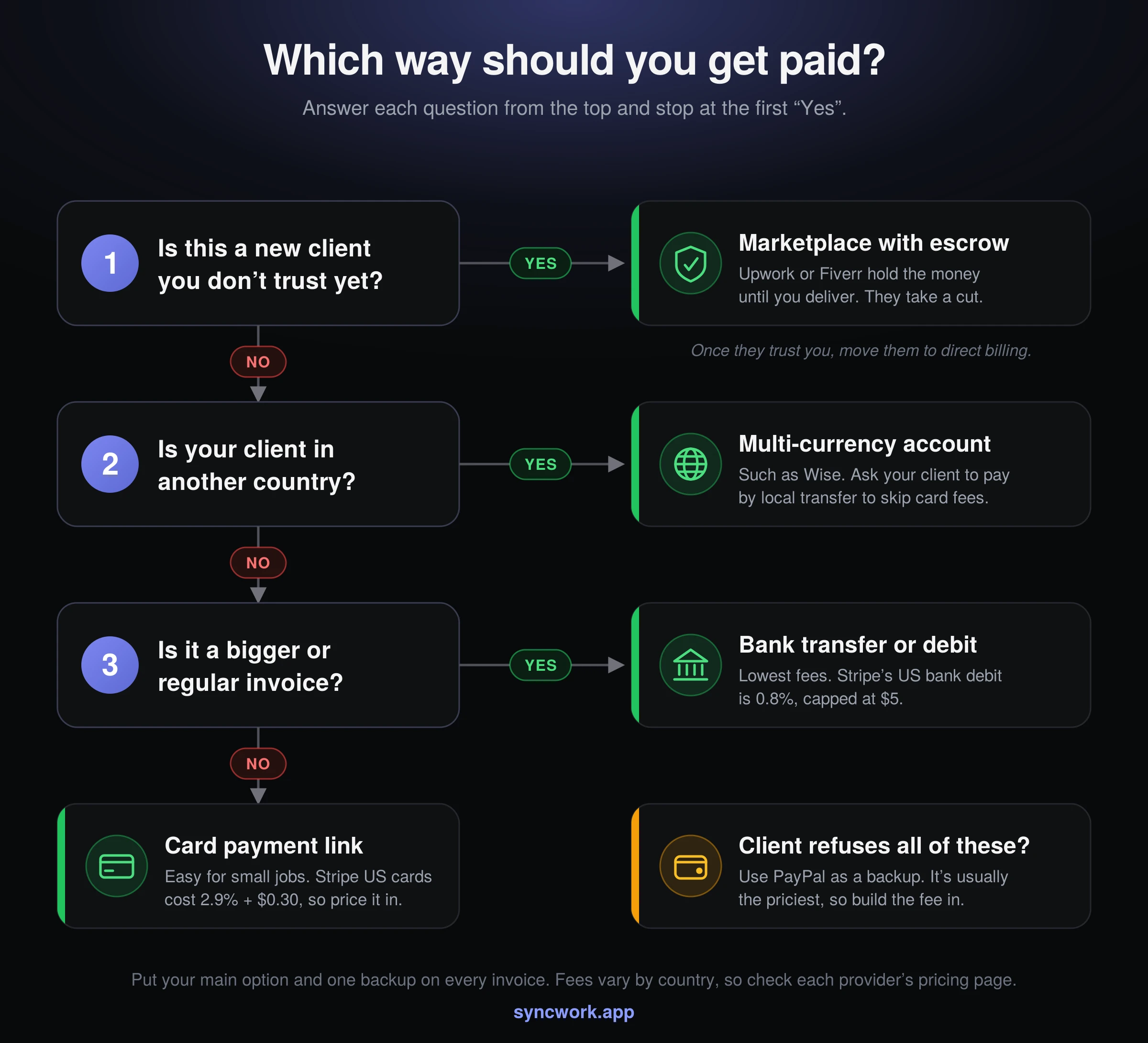
If you only read one section, read this one:
- Domestic client, regular work: bank transfer (or bank debit) is usually the cheapest and simplest.
- Client in another country: use a setup that lets them pay like a local, and compare the full cost, including currency conversion.
- Small job, or a client who just wants to click and pay: a card or payment link is fine, as long as you price in the fee.
- New client you don't trust yet: a marketplace with escrow protects you, but takes a cut.
- Client who won't use anything else: PayPal, as a backup.
Now let's look at each one.
What the fees actually look like
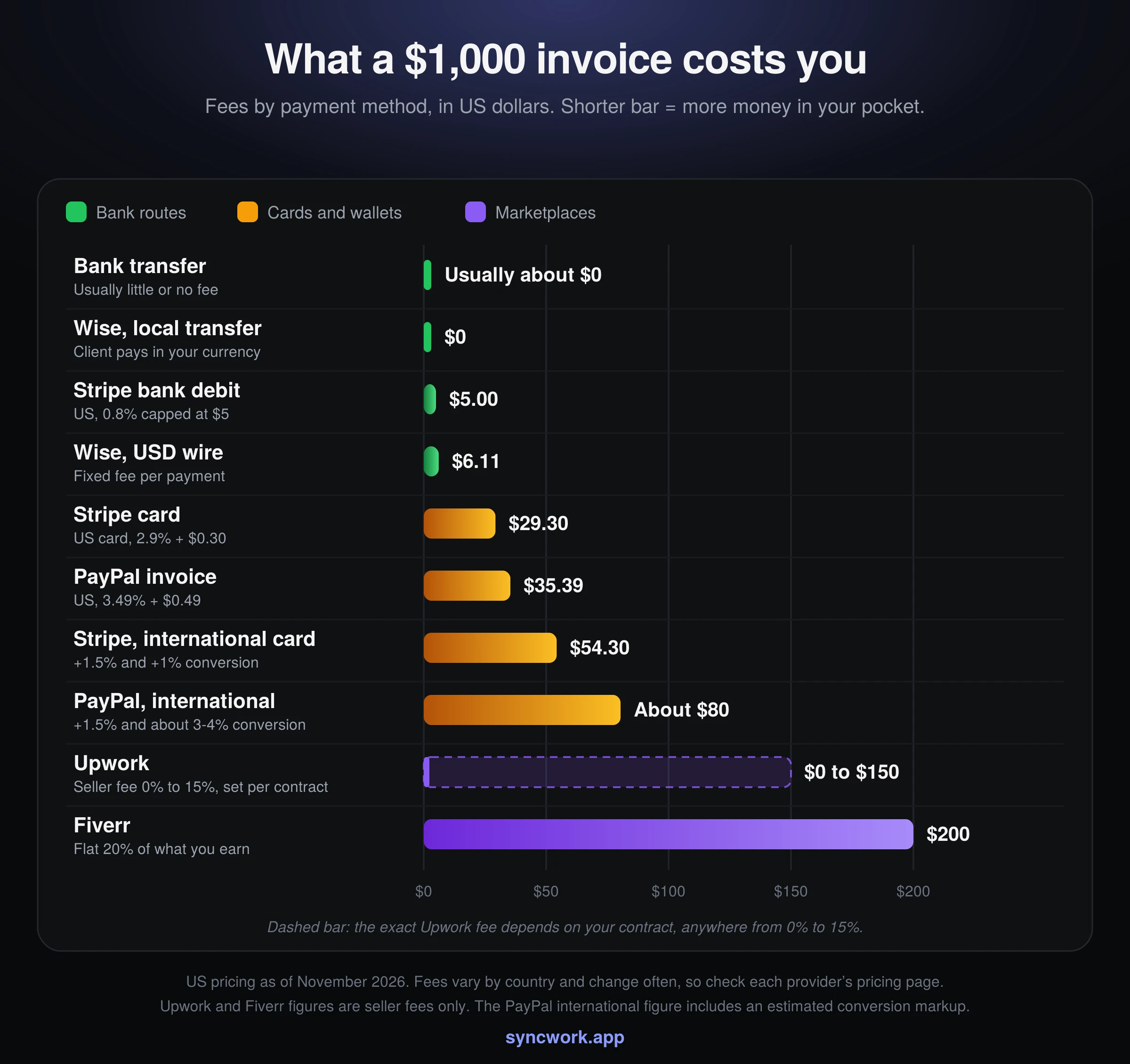
Here's how the main options compare. Fees change by country and payment type, so treat these as a starting point and check the provider's own page before you quote a price.
| Option | What it costs you | Payout speed | Best for |
|---|---|---|---|
| Bank transfer | Usually little or no fee. International transfers can add bank fees and weak rates | Hours to a few days | Regular clients, larger invoices |
| Stripe bank debit (US) | 0.8%, capped at $5 | A few days | Larger US invoices |
| Stripe card payment (US) | 2.9% + $0.30. Foreign cards add 1.5%, and conversion adds 1% | Usually 2 business days | Small invoices, clients who want to pay by card |
| PayPal invoice (US) | 3.49% + $0.49. International adds 1.5%, and conversion adds roughly 3% to 4% | Usually 1 to 2 business days | Clients who insist on PayPal |
| Wise | Free to receive local payments. $6.11 for USD wire or SWIFT. Conversion at the mid-market rate with a visible fee | Varies by route | International clients |
| Payoneer | Card payments can cost several percent. Withdrawal and conversion fees. An annual fee if you receive little | Varies | Marketplace payouts |
| Upwork | Freelancer fee of 0% to 15%, set per contract | Varies | Finding clients, with payment protection |
| Fiverr | 20% of what you earn, so a $1,000 job leaves you $800 | Varies | Packaged services, quick one-off gigs |
1. Bank transfer: the cheapest option for most freelancers
A direct bank transfer is the simplest way to get paid. The client sends money from their account to yours, and nobody in the middle takes a big slice.
Why freelancers like it
- Low or no fees, even on big invoices.
- No card limits or chargebacks.
- Clients with an accounts team are used to paying this way.
Watch out for
- It can take a day or more to arrive.
- Some international transfers get hit with bank fees and weak exchange rates.
- You have to share your bank details, so put them on the invoice and not in a chat.
In the US, there's a related option called bank debit (ACH), which services like Stripe offer. Stripe's published US pricing charges 0.8% for ACH debit, capped at $5. Cards cost 2.9% plus $0.30. On a $1,000 invoice, that's about $5 versus $29.30. On a $10,000 monthly retainer, ACH costs $5, so you keep 99.95% of the invoice.
2. Stripe: easy for clients, pricier on cards
Stripe lets you send a payment link, so your client can pay by card in a few clicks. It feels professional and it's quick, and it can also do bank debits and recurring billing for retainers.
The cost is the catch. In the US, a card payment costs 2.9% plus $0.30. If your client pays with a foreign card, that adds 1.5%. If the payment needs currency conversion, add another 1%. Stack them up and a cross-border card payment can cost over 5.4%, plus the 30 cents.
When it makes sense
- Small invoices, where a few dollars in fees is no big deal.
- Clients who want to pay by card and won't pay any other way.
- Retainers, where you want billing to run on its own.
A tip: for bigger invoices, offer bank debit or transfer as the default and let the card be the backup.
3. PayPal: familiar, but usually the most expensive
PayPal is popular because almost everyone already has an account. A client can pay in a minute without signing up for anything new. That makes it great for non-technical clients.
The downside is cost. In the US, a PayPal invoice costs 3.49% plus $0.49. For an international payment, PayPal adds 1.5%. And if the money has to be converted into another currency, it adds a markup of roughly 3% to 4% on top. Add it all up and an international payment can cost close to 8%.
That's why most freelancers treat PayPal as a backup. Keep it for clients who won't pay any other way, and build the fee into your price if you do.
4. Wise: built for international clients
If you work with clients abroad, the biggest hidden cost often isn't a fee. It's the exchange rate. Banks and some payment services add a markup to the currency conversion that never shows up on a receipt.
Wise is built to fix that. It gives you local bank details in major currencies, so a client in Europe or the UK can pay you with a normal local transfer, as if you were down the street. According to Wise's pricing page, receiving local payments in supported currencies is free. The one exception is wire or SWIFT payments in US dollars, which cost a fixed $6.11 per payment. Ask your client to use a local transfer instead and you skip that fee.
What to check before you choose one
- The total cost, including the conversion rate, and not just the headline fee.
- Which currencies and countries it supports.
- How you'll move the money into your own bank account.
Check Wise's calculator for your exact currencies. Fees and supported countries change.
5. Payoneer: mostly for marketplace payouts
Payoneer is a payout service that's built into big freelance marketplaces, so it's common for people who get paid through platforms like Upwork or Fiverr. It also gives you local receiving accounts in key currencies.
It can cost more than the options above. Accepting a card payment directly through Payoneer can cost several percent, withdrawing into a local bank account can add conversion fees, and there's an annual fee if you receive very little in a year.
It's most useful if your income mainly comes from marketplaces, or if you live somewhere where regular banking options are limited. If your clients pay you directly, compare it with Wise first.
6. Marketplaces: protection, at a price
Platforms like Upwork and Fiverr hold the client's money in escrow and release it when you deliver. That takes the risk of non-payment off your plate, which is a real benefit when you're new or working with a stranger.
But you pay for that protection:
- Fiverr takes a flat 20% of what sellers earn, so a $1,000 job leaves you with $800.
- Upwork charges a variable freelancer service fee of 0% to 15%, set per contract. Check your rate before you accept a job.
- Freelancer.com also takes a percentage of fixed-price jobs, so read its current fee page.
Marketplaces differ in how they handle disputes. Upwork uses work diary tracking for hourly jobs and reviews fixed-price work held in escrow, while other platforms have their own review or arbitration steps.
A simple rule: use a marketplace to find clients and build a track record. Once a client trusts you and you've worked together for a while, move them to direct invoicing. Check the platform's terms first, because some limit taking clients off the platform. Moving a long-term client to direct billing saves you the marketplace fee, which is up to 15% on Upwork and 20% on Fiverr.
7. Stablecoins and crypto: fast, but not for everyone
Some freelancers get paid in stablecoins, which are digital currencies tied to the US dollar. A traditional international bank wire (SWIFT) can take a few business days, while a stablecoin payment can arrive in minutes, any day of the week, and network fees can be tiny.
For people in countries where the local currency loses value quickly, that can be a real advantage, because you can hold dollars and convert only when you need to.
It has trade-offs:
- You need to look after your own wallet and keep it secure.
- You need a way to turn it into local money, and that may cost something.
- Many companies' finance teams don't want to pay freelancers this way, because of compliance and tax reporting rules.
Some managed contractor-payment platforms try to fix that. They handle onboarding, identity checks and tax paperwork, and they can pay in regular currency or stablecoins. They charge a platform fee, so compare the total cost. If you're curious, start with a small payment and check your local tax rules first.
8. Regional options worth knowing about
Where you live changes the best answer:
- In Europe (the EEA): a business account that supports SEPA Instant payments, such as Revolut Business, lets clients pay in seconds with no hassle.
- In Africa and other emerging markets: services like Grey give you virtual USD, EUR and GBP account details, which helps when local banks make it hard to receive from abroad.
- In Asia-Pacific: a multi-currency service such as Airwallex offers local collection accounts in several currencies.
Fees and availability vary by country, so check what applies where you live.
Which option should you pick?
Use this as a quick guide:
| Your situation | A good starting point |
|---|---|
| Regular domestic client, larger invoices | Bank transfer, or bank debit if you use Stripe in the US |
| International client, regular work | Wise or another multi-currency account, paid by local transfer |
| Fast international payments | Stablecoins through a managed platform, if you're comfortable |
| Small job, client wants to click and pay | A card payment link, with the fee priced in |
| Client who refuses everything else | PayPal as a backup |
| New client you don't trust yet | A marketplace with escrow, then move to direct billing |
You don't have to pick just one. Most freelancers offer a main option and one backup, and put both on the invoice.
The step most people skip: make it easy to pay
Choosing a payment method is only half of it. The other half is making the invoice so clear that your client can pay without a single question.
- Track your time properly. An invoice is only as good as the hours behind it. Syncwork's time tracking starts a timer in one click, and our guide to filling out a timesheet shows how to get your hours right. You can also try the free timesheet generator.
- Send a clear invoice. Include a unique invoice number, a real due date, a description of the work and your payment details. Not sure what's required? Read what to include on an invoice, or build one with the free invoice generator.
- Put the payment method on the invoice. Show how to pay: bank details, a payment link, or both. Every question a client has to ask adds a day to your wait.
- Use a real due date. "Please pay by Wednesday, December 2, 2026" is easier to act on than "Net 30".
- Send it right away. Invoice as soon as the work is delivered, while the value is fresh.
- Say thank you and follow up politely. A friendly line on the invoice costs nothing, and if the due date passes, a short, kind reminder with the invoice attached usually does the job.
Stop chasing payments: let your hours become the invoice
If you track your time already, you shouldn't have to retype it into an invoice. With Syncwork you can:
- Track time without thinking about it. Start, pause or stop a timer in a click, or use the desktop app, which works offline and recovers a timer after a shutdown.
- Turn tracked hours into an invoice. Syncwork invoicing fills in your business details and logo, and exports a clean PDF.
- See which clients are worth it. Reports show which projects and clients make you money.
- Keep clients separate. Workspaces give each client or department its own space.
The Free plan is built for solo freelancers, with 1 seat and 1 workspace. Invoicing is part of the Premium plan, which starts at $4.79 per seat per month on annual billing, and there's a 14-day trial with no card required. See the pricing page for details.
Still choosing a tool? Read our guide to the best time tracking software for freelancers.
Free tools to try right now
- Free invoice generator: make a clean invoice in minutes. No account needed.
- Free timesheet generator: log your hours and download a PDF to attach to your invoice.
FAQ
Ready to get paid faster?
Start your free Syncwork trial, or make an invoice now with the free generator. Questions before you switch? Talk to us, or browse the blog for more guides.